Price Filter

The price range. Both fields carry the catalogue's own range, so submitting it untouched changes nothing.
Place it on its own, beside the grid or in a sidebar of yours. It is one of the groups of Catalog Filters — if you use both, turn this group off there, or it shows up twice. How every filter behaves — links, folding, «show more» — is on Filters.
Its options
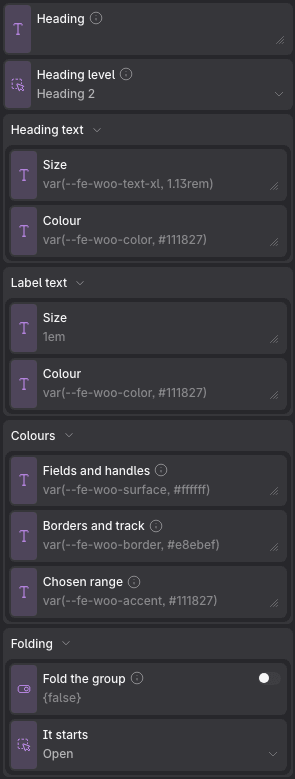
Props
| Prop | Type | Default | What it does |
|---|---|---|---|
| Heading | text | — | What this group is called. Leave it empty to keep the name the attribute or the taxonomy already has — which stays right when somebody renames one. Ignored when this filter draws more than one group. |
| Heading level | choice: h2, h3, h4 | h2 | On its own beside the grid it is usually an h2; inside a sidebar under its own heading, an h3. |
| Heading text → Size | text | var(--fe-woo-text-xl, 1.13rem) | |
| Heading text → Colour | text | var(--fe-woo-color, #111827) | |
| Label text → Size | text | 1em | |
| Label text → Colour | text | var(--fe-woo-color, #111827) | |
| Colours → Fields and handles | text | var(--fe-woo-surface, #ffffff) | The background of the two amounts and of the slider handles. |
| Colours → Borders and track | text | var(--fe-woo-border, #e8ebef) | The fields, the group and the line the handles run along. |
| Colours → Chosen range | text | var(--fe-woo-accent, #111827) | The stretch between the two handles, and their outline. |
| Folding → Fold the group | on / off | off | Turns the title into a disclosure, so a long column reads as a list of headings. A group that is filtering something always opens, whatever the state below says. |
| Folding → It starts | choice: open, closed | open |
It reads the same variables as the whole column: see Catalog Filters.