Filters
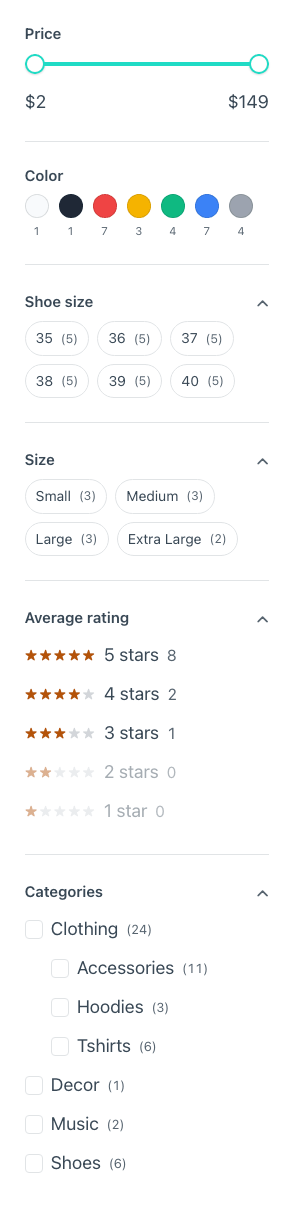
Catalog Filters is the whole sidebar: price, attributes, rating and categories. Each group can also be placed on its own — Price, Color, Attribute, Rating and Category — so you can lay them out where you want.
Every choice is a link, so each state has an address to share, cache and go back from, and it works with JavaScript off. It uses WooCommerce's own query arguments, the same its widgets use, so nothing here re-implements a query.
| Filter | What it is for |
|---|---|
| Price Filter | The price range. Both fields carry the catalogue's own range, so submitting it untouched changes nothing |
| Color Filter | Any attribute whose terms have a swatch colour — not "the one called colour": a shop in German, or a "finish" attribute, work the same |
| Attribute Filter | One attribute people pick by reading: size, material, capacity. Global attributes only |
| Rating Filter | WooCommerce's own rating_filter, so it agrees with the stars on every card |
| Category Filter | Each category links to its own archive — its address, its title, its description — rather than narrowing the shop to look like it |
If you place a group on its own and Catalog Filters, turn that group off in Catalog Filters, or it shows up twice.
A long column can fold, and long lists can stop short. Folding turns each
group's title into a disclosure — switch it on, and say whether it starts open or
closed. A group that is filtering something always opens anyway, because a filter
you cannot see is one you will not turn off. Show more keeps the first few
choices of a list and puts the rest behind a button, in your own words if you
write them ({count} is where the figure goes) — and it opens by itself when what
is hidden is what somebody filtered by, so a colour chosen from a shared address
is never off screen.
Both are <details>: they open, close, take the keyboard and announce their own
state with no JavaScript, and every choice is in the page either way. Off by
default, so a shop that updates its components looks exactly as it did.