Hearts in a loop
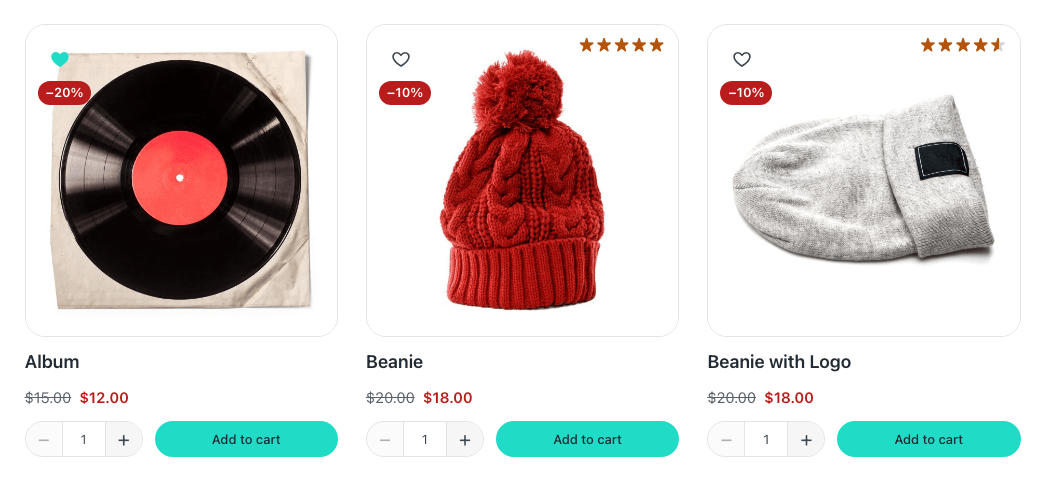
The shop's grid, a blog index, a row of the latest posts, the wishlist page itself: all of them are an Etch Loop drawing a card you design. Put a Wishlist Button in the card and each heart saves its own card's item — a product, a post, a page, anything published.
The one rule: call the item this
When you add the loop, name its item this. That is all the setup there is.
The Wishlist Button reads {this.id}, {this.type} and {this.title} out of the box — what to save, its kind, and the name a screen reader says after «Save» — so inside a loop whose item is this, each heart follows its own card without setting a single prop. On a product or post template, outside any loop, this is the page being viewed, and the heart saves that page.
Call the item anything else — post, item — and {this.…} no longer points at each card: the hearts save the page they are on, or nothing at all. Rename the item to this, or set the button's Item, Item type and Item name to your name: {post.id}, {post.type} and {post.title}.
Which loop
| Where | The loop |
|---|---|
| The shop, its categories, its searches | Etch's Main Query loop, with the product card. |
| The blog, a category of posts | Etch's Main Query loop on the blog's archive. |
| A section anywhere: featured products, the latest posts | A WP Query loop of that post type. |
| The wishlist page | The Wishlist loop — see The wishlist page. |
Any post type works: the heart saves whatever its card is about, and the wishlist can then list each kind on its own.
Put it in the card
- Outside the card's link. A card is often one big link to the product or the post, and a button inside a link is two controls in one: a click on the heart would also follow the link, and a screen reader cannot tell them apart. Put the heart beside the link — the demo's card places it over the photo's corner, next to the linked image rather than inside it.
- Icon only is what a card wants (Display). The label can float on hover (Label shows) when there is room for a tooltip but not for words.
- Button size, under Size, is the target a finger has to hit. It reads
--fe-woo-control-size, 2.75rem, comfortable on a phone.
Good to know
- Every heart for the same item changes together: the same product in the grid and in a row of related products is saved and removed as one.
- The hearts fill in in the browser, for guests and customers alike, so a cached catalogue still shows each visitor their own hearts.
- On the wishlist page, removing a card's heart takes that card away and offers Undo — see The wishlist page.